

If you want to log sets, weights and reps from your wrist without pulling out your phone mid-set, TotalBodyIQ's Apple Watch app does this as part of its ongoing Free tier, alongside a rest timer and full workout history. This guide explains exactly what logging looks like on the Watch, what stays Free, what needs Pro, and where heart-rate or Calendar features depend on permissions and your paired sensor rather than the app alone.
What should a weight training app on Apple Watch actually do?
At minimum it needs to let you log a weight and rep count for each set without taking your phone out, time your rest between sets, and keep a history you can look back on. Some apps add heart rate during strength work, a session summary when you finish, and a way to start a planned workout rather than typing exercises from scratch each time.
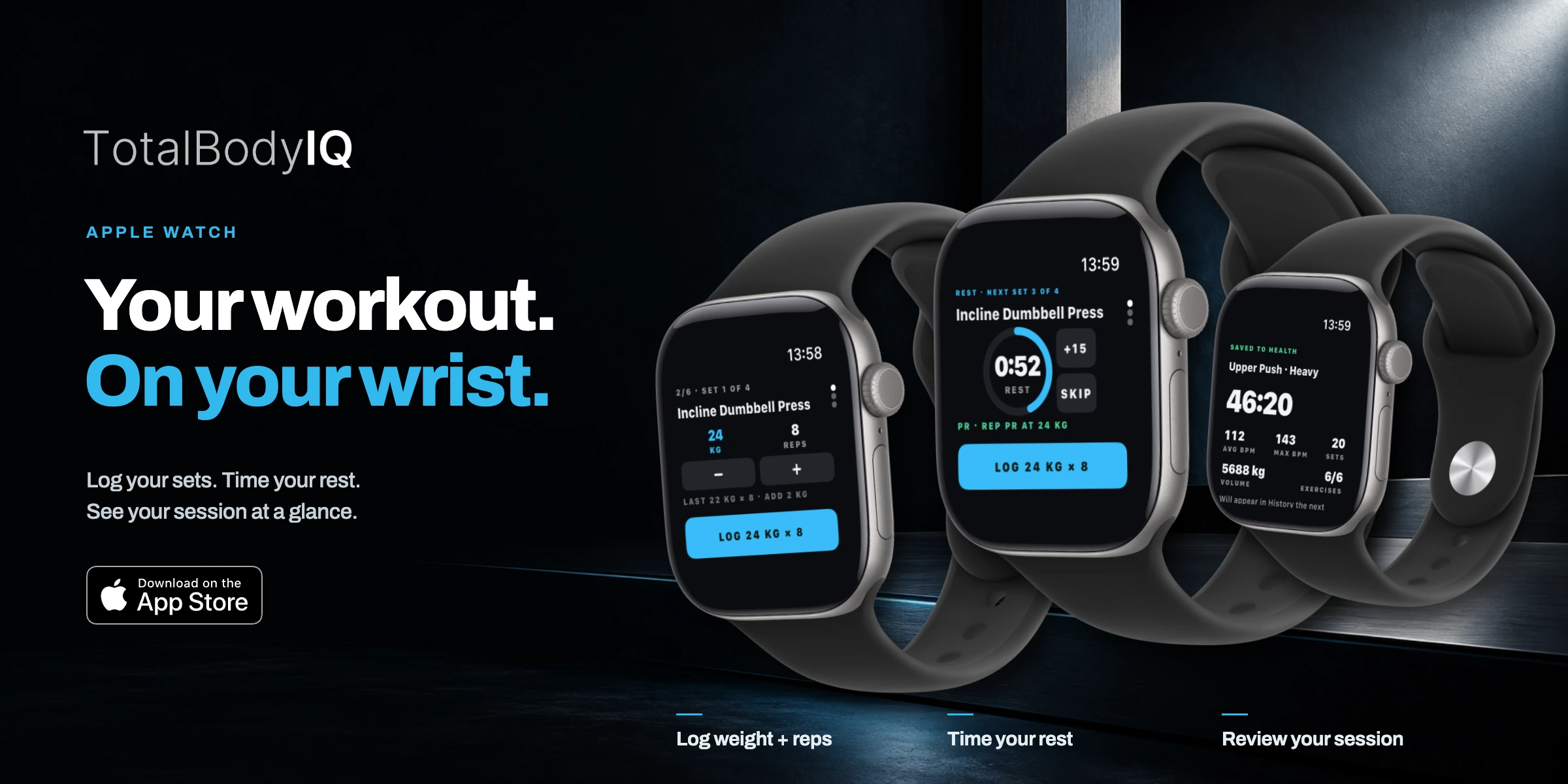
TotalBodyIQ has a native Apple Watch app that covers strength logging, cardio recording and acting as a companion to a session started on iPhone. Logging weight and reps, the rest timer, and full workout history are part of the ongoing Free tier, not a trial.
How do I log a set from my wrist without opening my phone?
The practical flow in TotalBodyIQ looks like this:
- Start a workout, either one you built yourself or an existing saved workout.
- On your Watch, open the current exercise, which shows the set number, your last recorded weight and reps as a reference point.
- Enter the weight and reps for the set you just completed, then confirm to log it.
- The Watch moves you into a rest timer, with options to skip or add time, before prompting the next set.
This is illustrative of how the logging screen is laid out, not a claim about how fast any individual person will find it in a noisy gym. Everything logged this way is Free; there is no cap on how many sessions or sets you record.
Will I see my heart rate while I'm lifting?
You can, if you meet two conditions: Health permissions are granted, and you have a heart-rate source, either the Apple Watch itself worn during the session or a paired Bluetooth monitor. With both in place, TotalBodyIQ can show live BPM and include average and peak heart rate in your session summary alongside sets, volume and duration.
Without a connected source, strength logging still works fully, you simply will not see heart-rate figures for that session. This is a sensor and permissions limitation, not a software one, and it applies to any app that reads heart rate from Apple Health or Bluetooth.

What's the difference between saving a session and saving a workout?
These are two separate things and it is worth being clear on which one you need:
| Action | What it does | Tier |
|---|---|---|
| Save a completed session | Adds that session to your workout history, with sets, weights and any cardio data attached | Free |
| Save a workout as a template | Keeps the structure, exercises and target sets so you can start it again later without rebuilding it | Pro |
If you only need a record of what you did, Free covers it indefinitely. If you want to reuse a specific session structure repeatedly without recreating it each time, that template-saving step needs Pro. Workouts and programmes you had already saved before trying Pro remain accessible even if Pro lapses.
How do I build a quick session from the Watch or phone without planning it myself?
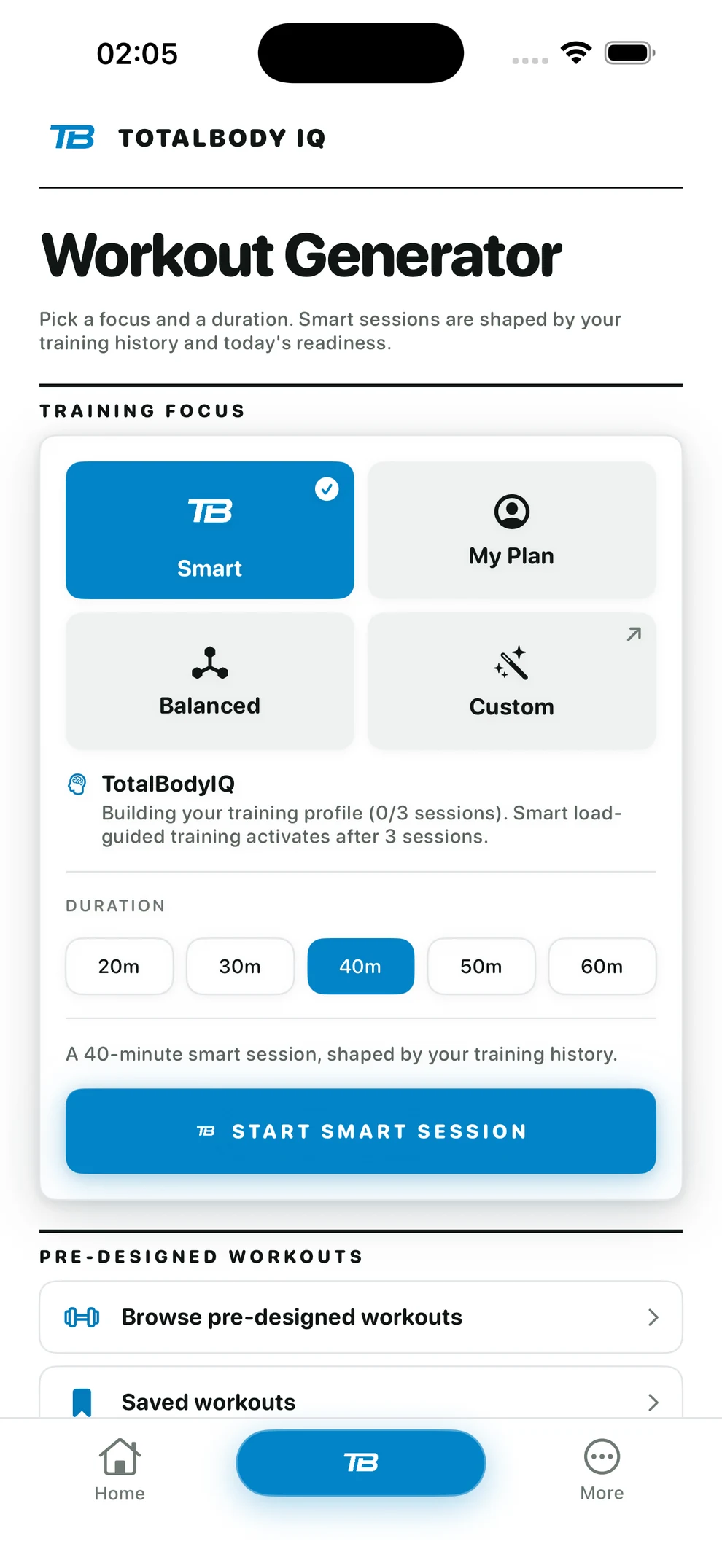
TotalBodyIQ's basic Workout Generator builds a full-body session from your available time and the equipment you select, and this basic route is Free with unmetered starts, confirmed under Included free on the App Store listing for version 22.2. You choose a duration, tick the equipment you have, and generate a session.
Pro adds more on top of that basic generation: a focus setting so the generator leans towards a specific pattern, curating the session from your Body Metrics load data, built-in cardio options inside the generated workout, and a favourites filter. Smart planning that builds sessions from your training history is also a Pro feature, separate from the basic Free generator. See the Workout Generator guide for how focus and curation change the output.
How do I know if my training is balanced across muscle groups?
Body Metrics is Free and gives you a body map showing sets and tonnage recorded per muscle group over a chosen period, for example the last 7 days. It is a summary of what you logged, not a diagnosis. If shoulders show far more sets than hamstrings, that tells you what you trained, not whether an imbalance exists or whether recovery is adequate.
Use it as a prompt to check your own programme choices rather than a clinical reading. For more on reading these figures sensibly, see muscle balance in gym training and the muscle map guide.
What if I also run or cycle, and want one app for both?
GPS cardio and supported heart-rate or Apple Health features are part of Free, subject to the same permissions and sensor conditions as strength logging. If you want strength and cardio tracked without switching apps, that combination is covered in using one app for strength logging and GPS runs, which goes into route and pace tracking in more detail than this guide does.
What are the real limitations I should know before relying on this for training decisions?
A few things worth being direct about:
- Body Metrics and readiness scores summarise recorded training and modelled load; they do not measure muscle growth, diagnose an imbalance or ensure recovery.
- Heart-rate accuracy depends entirely on your paired sensor and the permissions you have granted; the app cannot improve on what the sensor reports.
- Calendar-based planning exports events one way. If you edit something in Apple Calendar afterwards, that does not update your plan inside TotalBodyIQ.
- The app does not act as an AI coach and does not promise clinical-grade recovery measurement.
None of this stops the Watch app being useful for the basic job of logging sets and resting on a timer. It just means the richer summaries are context for your own judgement, not a verdict.
Frequently asked questions
Is logging weight training on Apple Watch free in TotalBodyIQ?
Yes. Strength logging, full workout history, the rest timer and building or completing workouts are all part of the ongoing Free tier, not a trial.
Do I need a separate heart-rate monitor to see BPM during a strength session?
No. A compatible Bluetooth heart-rate monitor or an Apple Watch worn during the session is needed, and Health permissions must be granted, before heart-rate data will appear.
What is the difference between saving a session and saving a workout?
Saving a completed session to your History is Free. Saving a workout as a reusable template in your library, so you can start it again without rebuilding it, is a Pro feature.
Can the app's muscle map tell me if a muscle group is undertrained?
Body Metrics summarises the sets, tonnage and load you have recorded; it does not measure muscle growth or diagnose an imbalance. Use it to see training patterns over time, not as a clinical reading.
Is the Workout Generator free or Pro?
Basic full-body workout generation from your available time and equipment is Free with unmetered starts. Generator focus, Body Metrics curation, cardio options and favourites inside the generator are optional Pro.